Configure Payload Mapping Rules
You configure payload mapping rules in an automation integration UI. The payload map configuration follows a similar pattern to LAM mapping. A configuration consists of name:rule pairs. The rule is macro enabled to allow you to convert or modify the alert or Situation values.
A standard payload map consists of rows of entries. Each entry is called a rule and creates a key:value pair in the resulting JSON object. Each rule contains the following components:
Name: The name of the rule. This becomes the key in the resulting JSON object.
Rule: The content of the rule. The evaluated content becomes the value associated with the key.
Default Value: A value to use if a substitution returns null. A default value cannot contain substitutions.
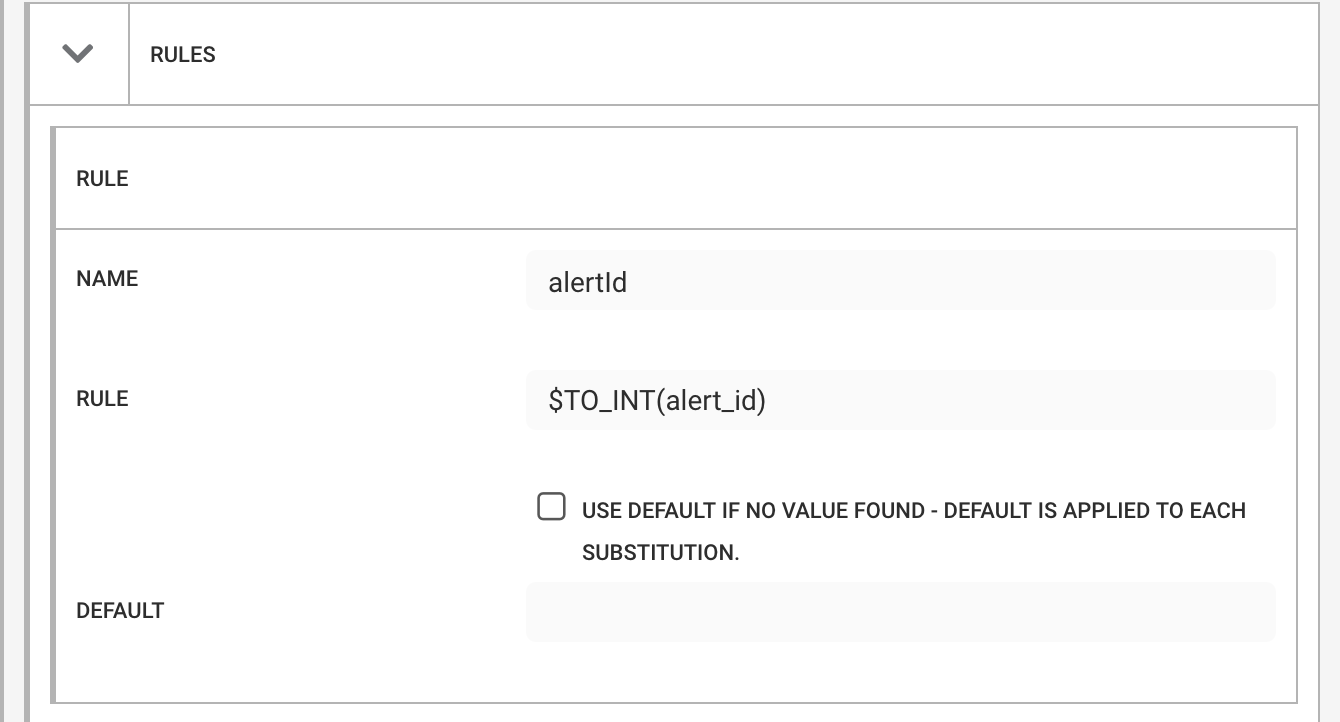 |
For example, a rule with a name of alertId and a rule of $TO_INT(alert_id) produces the following JSON object, where "nnnn" represents the alert_id of the alert CEvent:
{
  "alertId" : nnnn
}
A mapping rule called "location" which contains the following:
{ "city" : "$(custom_info.location.city)", "country" : "$(custom_info.location.country)" }Produces a simple target payload:
{
  location: '{ "city" : "London", "country" : "UK" }'
}
Configure a map name
Specify a name for the payload map. This becomes the key in the payload. In the previous example, this is alert number, alert text, and severity. The name is case sensitive.
Configure rules
Rules specify the values to populate in the payload. A rule can reference any alert or Situation attribute, including extended attributes under custom_info, such as custom_info.enrichment.cmdb.location.
A standard rule can contain either:
A single substitution.
A compound value containing literal text and one or more substitutions.
For example, given an alert with an alert_id of 999, the following rules produce the corresponding values:
Rule | Value |
|---|---|
| 999 |
This is my id: | This is my id: 999 |
Configure a freeform JSON definition
Add-Ons 2.7.0 introduced an enhancement to the Payload Map integration tile that allows a freeform JSON definition to define payload contents. The same substitution functionality is supported. The JSON object can be used together with standard key:value (name:rule) definitions or used exclusively to define the entire payload.
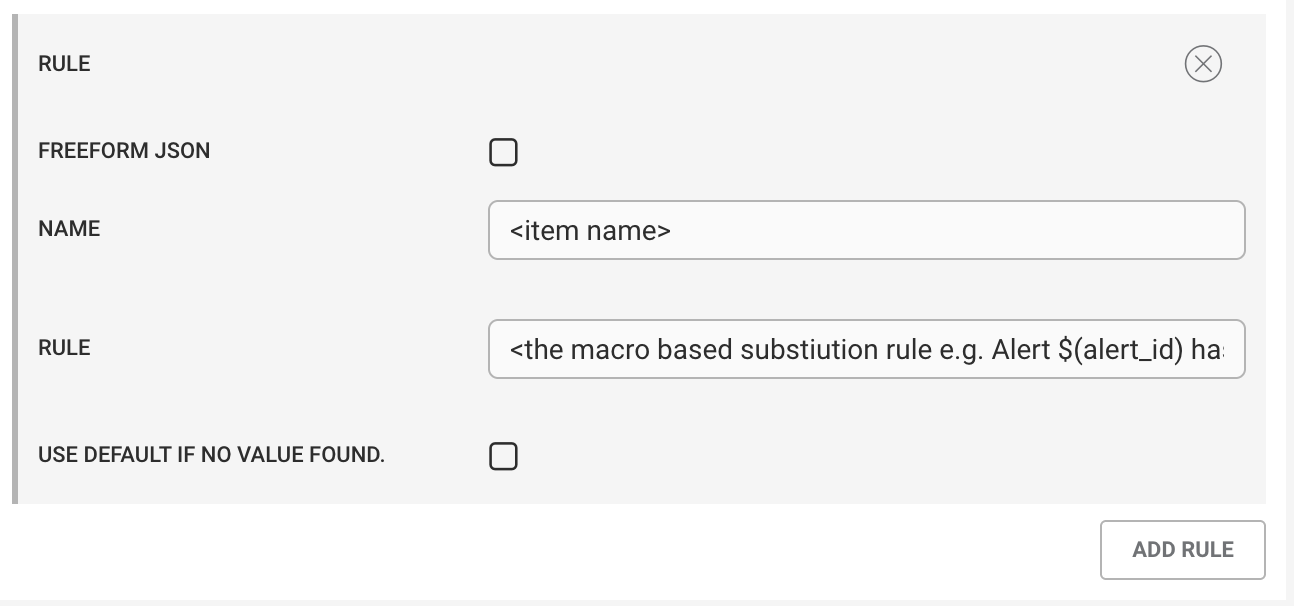
The rule definition now includes a Freeform JSON checkbox:
 |
To configure a freeform JSON definition:
Select Freeform JSON for the rule.
Enter the JSON definition in the displayed text area.
To use the JSON definition as the entire payload, select Root Object.
If you do not select Root Object, enter a name for the rule. The generated JSON object is added under that named key.
Note
You can use a freeform JSON definition:
As the value of a named key.
As the root payload object.
Alongside standard
name:rulemapping rules.
Named-Key Example
If you select Freeform JSON, specify details as the rule name, and do not select Root Object, the JSON blob becomes the value of the details key.
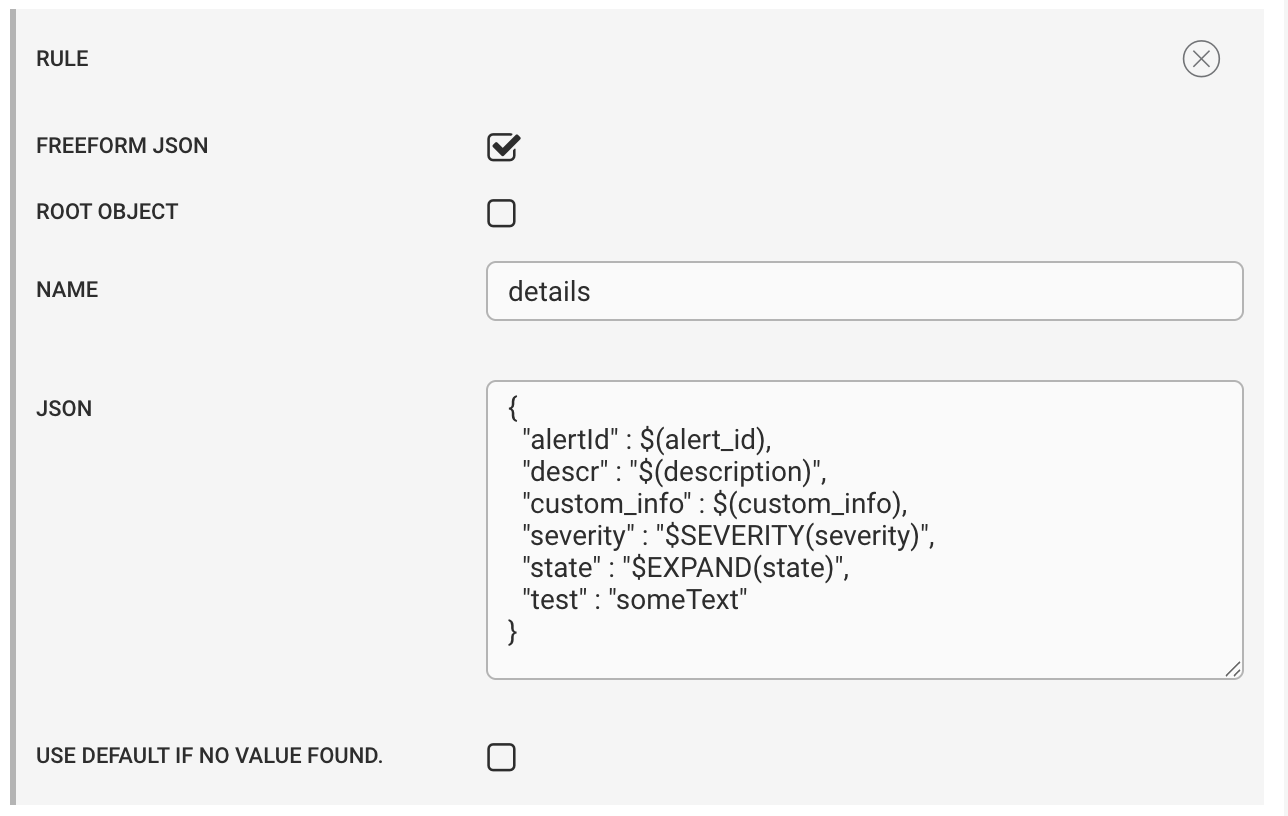 |
The resulting payload is:
{
   "details" : {
		"alertId": 1530488,
                "descr": "This is a test",
                "custom_info": {
        	"previousAlert": {},
                "type": 10703,
                "someList": ["a","b","c" ]
         },
         "severity": "Critical",
         "state": "Unassigned",
         "test": "someText"
	}
}
Root-Object Example
Select Root Object to use the JSON blob as the entire payload. When you select this option, the rule name field is no longer displayed because the JSON definition is not placed under a named key.
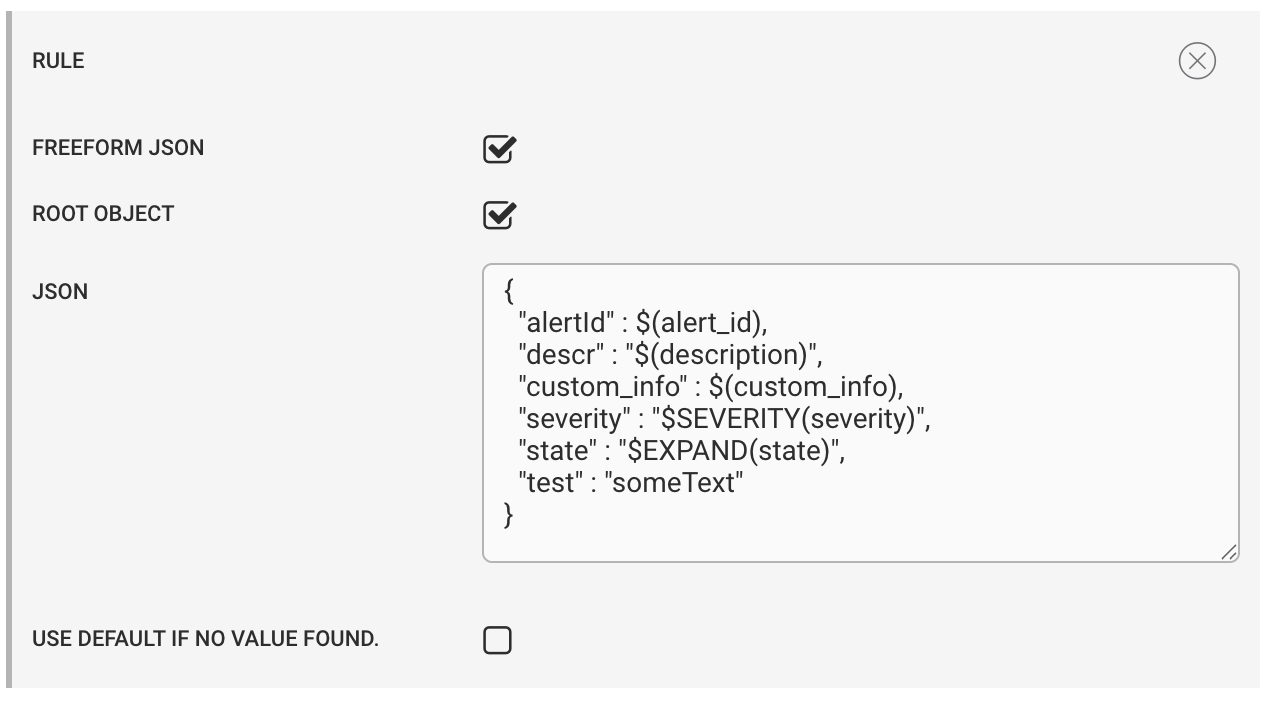 |
Note
The Name text box is hidden, and the resulting payload becomes the root object of the payload:
{
	"alertId": 1530488,
        "descr": "This is a test",
        "custom_info": {
    	"previousAlert": {},
    	"type": 10703,
       	"someList": ["a","b","c" ]
    },
        "severity": "Critical",
	"state": "Unassigned",
	"test": "someText"
}
Freeform JSON Definition Mixed Rules
You can use a named freeform JSON definition alongside standard name:rule mapping rules. Both rule types are evaluated and added to the payload.
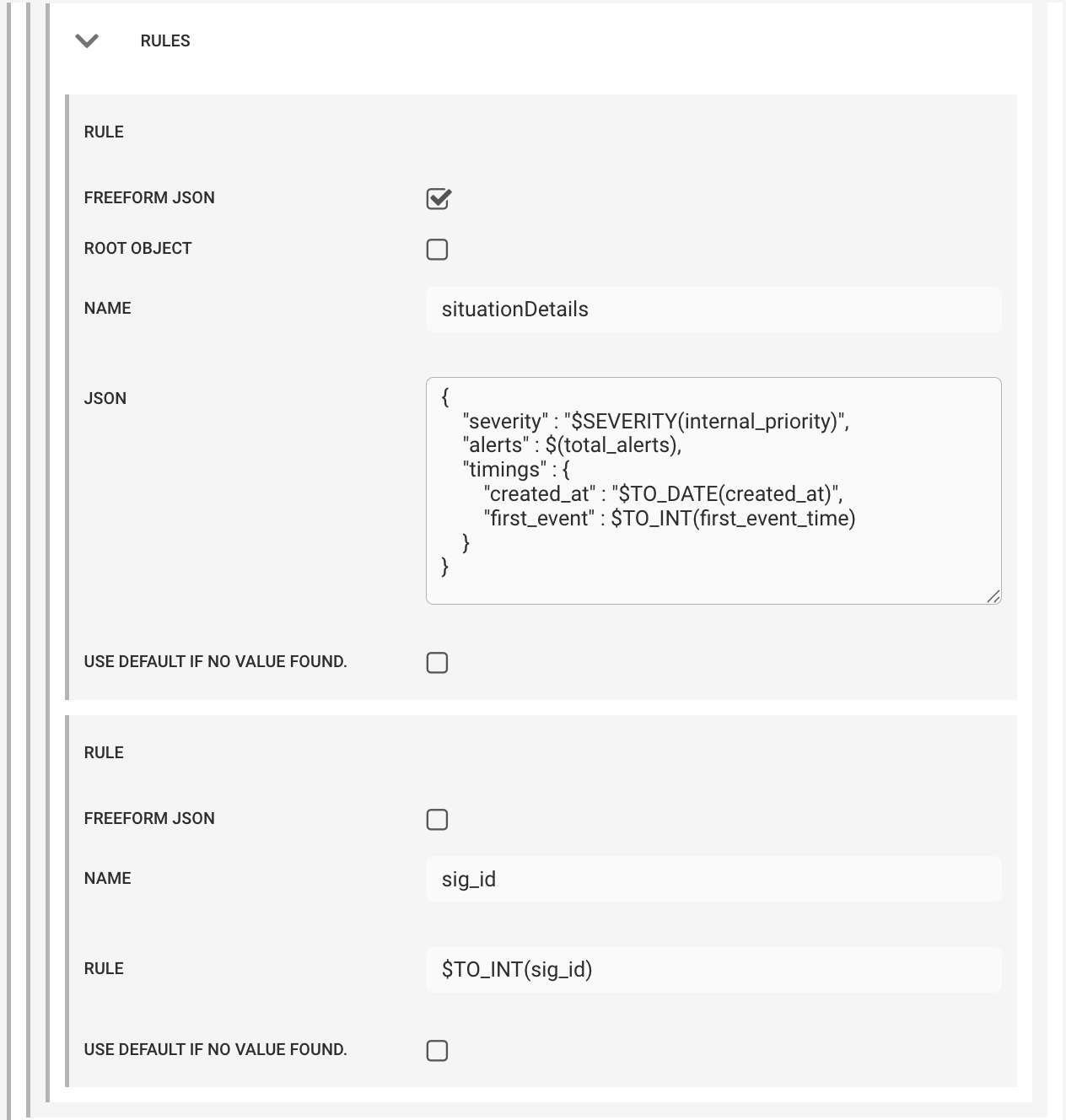 |
For example, a freeform JSON rule named situationDetails combined with a standard sig_id rule can produce:
"payloads": {
        "8048": {
            "situationDetails": {
                "severity": "Critical",
                "alerts": 5,
                "timings": {
                    "created_at": "2025-08-21T08:37:05.000Z",
                    "first_event": 1755765424
                }
            },
            "sig_id": 8048
        }
    }
Root Object Limitation
Caution
Do not combine Root Object with standard name:rule mappings when you require one merged root payload. A root-object JSON definition does not merge with standard rules and can result in a separate root_payload_key object. To generate a single root-object payload, use only the freeform JSON definition.
Freeform JSON Definition JSON Validity
A freeform JSON definition must produce valid JSON after substitutions and macros are evaluated.
Quote all key names. Quote a substituted or macro-generated value when the evaluated result is a string.
An integer substitution can remain unquoted:
{
	"date" : $(created_at)
}
If created_at contains an integer, the evaluated result is valid JSON.
A TO_DATE result must be quoted because the macro returns a string.
Invalid:
{
	"date" : $TO_DATE(created_at)
}
Valid:
{
	"date" : "$TO_DATE(created_at)"
}
String substitutions must also be quoted.
Invalid:
{
	"descr" : $(description)
}
Valid:
{
	"descr" : "$(description)"
}
Note
Always enclose JSON key names in quotation marks.
Add current time
To add the current epoch time to the payload, use $(moog_now) as the rule. To convert the value to a human-readable ISO date, use $TO_DATE(moog_now).
Macros
The Payloads integration supports the following Macros:
Macro | Function |
|---|---|
<empty macro> | No action. For example, |
| Ensures the end value is an integer. For example, |
| Ensures the end value is a string. For example, |
| Converts an epoch time value to an ISO string. See the Mozilla documentation for details. |
| Converts the final values within a rule to a JSON object. For example: |
| Converts true/false indicators to boolean true or false. |
| Converts an enumerated value into the corresponding human readable string. For example, a severity value of “5” to “Critical”. |
| Creates a context link to the in-scope Situation’s Situation Room. |
| Creates a context link to the in-scope alert in an alert list. |
Caution
When performing a substitution, all values are initially treated as strings, regardless of the source data type in the CEvent object.
For example, an alert_id value of 999 is substituted as "999", even when it is the only value in the rule. Convert values as required to match the receiver's expected data type (for example, if the receiver expects a numeric value, use the appropriate macro to convert the value).
See Macros Reference for more information.
Substitutions
Substitutions allow a CEvent attribute to be replaced in the rule text when the payload is generated.
To substitute alert and Situations attributes into the payload, use the format "$(<attribute>)". The integration interprets any other format as a string.
For example:
A rule of
"$(alert_id)"substitutes the value ofalert_idinto the payload.A rule of
"alert_id"inputs the string"alert_id"into the payload.
You can use this to create complex compound values which contain both substituted values and text. For example, given the following configuration:
"The alert_id is $alert_id"
The final payload map contains:
"The alert_id is 99"
To include a macro in the substitution, use the format "$<macro>(<attribute>)".
The following table provides valid and invalid examples.
Rule | Validity |
|---|---|
| Valid: Uses the correct form |
| Invalid: Does not enclose the attribute within braces. |
| Valid: Uses the correct form |
| Invalid: Does not include the prefix "$". |
Configure default values
In certain scenarios the rule is unable to determine a value, for example when the rule contains an alert or Situation field that does not exist. You can configure a default value to use when this occurs. Check Use default and enter a value in the Default field. This field's default value is an empty string, and the default value does not apply to the entire rule.
For example, you have the following rules to substitute "$(custom_info.myValue)":
In the first rule, the only value in Rule is the substitution:
Name: MyValue
Rule:
$(custom_info.myValue)Use Default: Enabled
Default: Unknown
In the second rule, Rule contains a compound rule which consists of text, the substitution from the first rule, and
$(sig_id):Name: MyCompoundValue
Rule: This is myValue
$(custom_info.myValue)$(sig_id)Use Default: Enabled
Default: Unknown
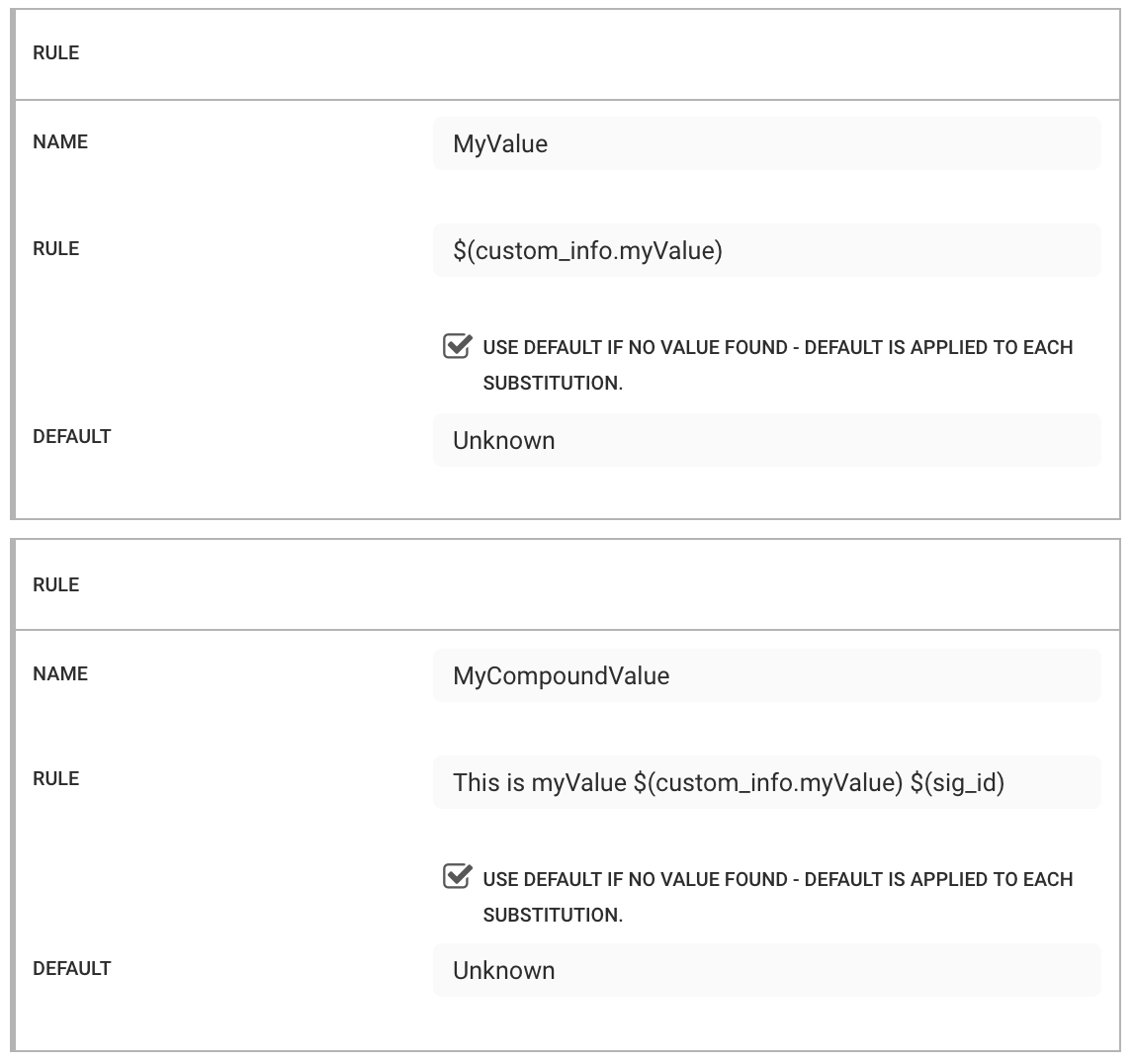
If custom_info.myValue does not exist, the default value 'Unknown' replaces each individual occurrence, as opposed to overriding the entire rule.
For example, if sig_id is 32, the two rules produce the following payload:
{
    MyValue: 'Unknown',
    MyCompoundValue: 'This is myValue Unknown 32'
}
The rule applies the default value before macro evaluation. For example, given the following rule:
Name: defaultTime
Rule:
$TO_DATE(custom_info.epoch)Use Default: Enabled
Default: moog_now
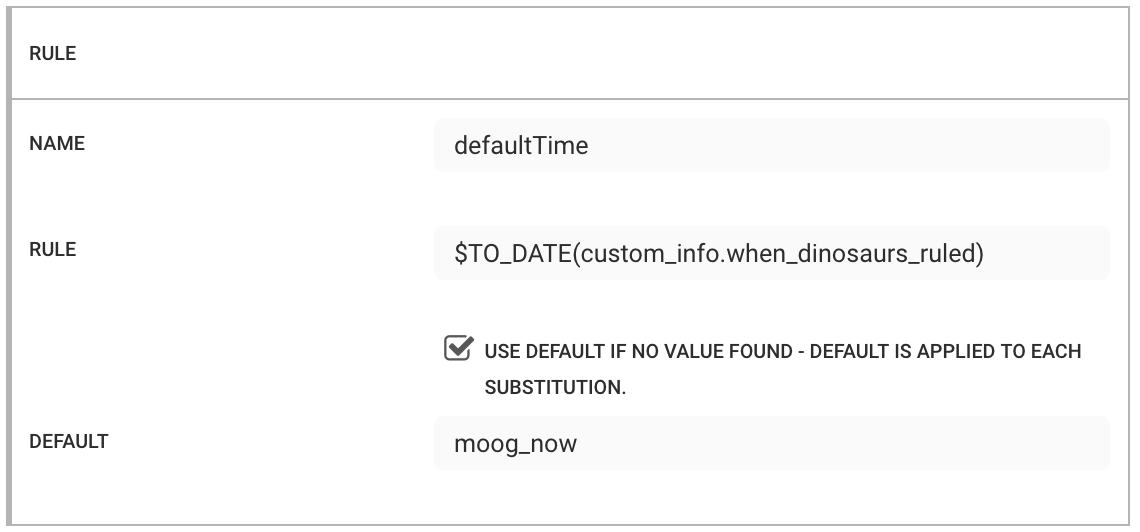
If there is no value for "custom_info.epoch", the rule applies "moog_now", and only then applies the $TO_DATE() macro. You can see this in the debug level logging:
 +|ceventMacroMap: Using default value moog_now for custom_info.when_dinosaurs_ruled as no value was found|+
 +|ceventMacroMap: Running TO_DATE on 1582035063|+
 +|ceventMacroMap: Macro TO_DATE returned 2020-02-18T14:11:03.000Z for value 1582035063 for attribute custom_info.when_dinosaurs_ruled|+
 +|Adding:defaultTime, 2020-02-18T14:11:03.000Z|+