setMasterAlert
A Workflow Engine function that sets the master alert for a given Situation. It runs exclusively within an Alert Inform–based workflow, where it executes in the context of an alert and receives the target Situation ID through the inform payload. The action then updates the specified Situation by assigning the in-scope alert_id to the custom_info.mooghandling.master_alert field.
This function is available as a feature of the Add-ons v2.7 download and later.
This function is available for alert and Situation workflows.
Back to Workflow Engine Functions Reference.
Set Master Alert Manually
To set a Master Alert manually, follow the steps below:
Open the required Situation.
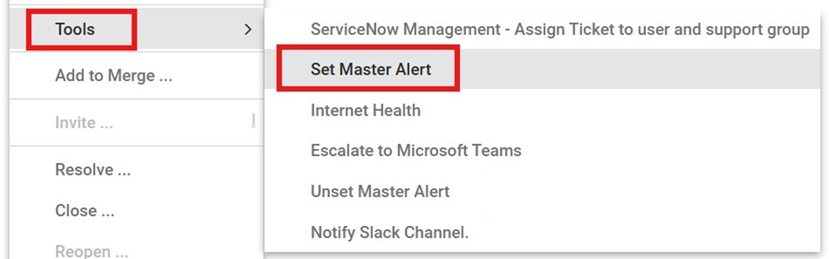
Right-click the situation, and then select Tools > Set Master Alert.
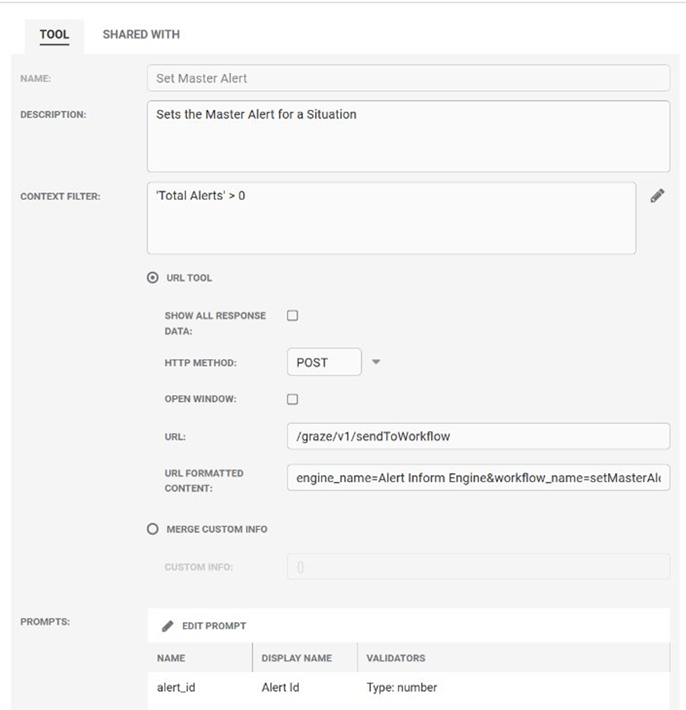
In the Alert Id field, enter the ID of the alert that you want to set as the master alert.
Click Run to submit the request.
Note
You can manually override the master alert selection by using the Set Master Alert tools available from the right-click Tools menu.
Arguments
Workflow Engine function setMasterAlert has no arguments.
Example
The following example demonstrates typical use of Workflow Engine function setMasterAlert.
To set the master alert for Situation 738 to alert 42783 the Graze call sendToWorkflow would be used with the following parameters:
{
	"engine_name" : "Alert Inform Engine",
	"workflow_name" : "setMasterAlert",
	"sitn_id" : 42783,
	"context" : {
     	"sig_id" : 738
     }
}
Within the sendToWorkflow request body:
Set
alert_idto the master alert ID. This ensures the workflow runs in the context of that alert.Set
context.sitn_idorcontext.sig_idto the target Situation ID.