getAlertDetailsForSituation
A Workflow Engine function that collects alert details from all alerts associated with a Situation and stores them in an alertDetails object within the Workflow Context. This enables subsequent actions (for example, copyToPayload) to reuse the collected data. The attributes to be included can be specified directly within the action as a list or derived from a Payload Map configured in the Payloads integration tile.
The alertDetails object in the Workflow Context is a list of objects, where each object contains details for a member event.
For example:
"alertDetails": [
        {
            "description": "This is a test",
            "host": "10.0.0.1",
            "alert_id": "1530488"
        },
        {
            "description": "This is a test",
            "host": "10.0.0.1",
            "alert_id": "1530493"
        },
        {
            "description": "This is a test",
            "host": "10.0.0.1",
            "alert_id": "1530494"
        },
        {
            "description": "This is a test",
            "host": "10.0.0.1",
            "alert_id": "1530495"
        },
        {
            "description": "This is a test",
            "host": "10.0.0.1",
            "alert_id": "1530496"
        }
]
The alert_id is added automatically and does not need to be explicitly configured in the action or Payload Map.
This function is available as a feature of the Add-ons v2.7 download and later.
This function is available for Situation workflows only.
Back to Workflow Engine Functions Reference.
Defining Attributes in the Action
If attributes are defined in the action, the resulting keys match the attribute names. For example:
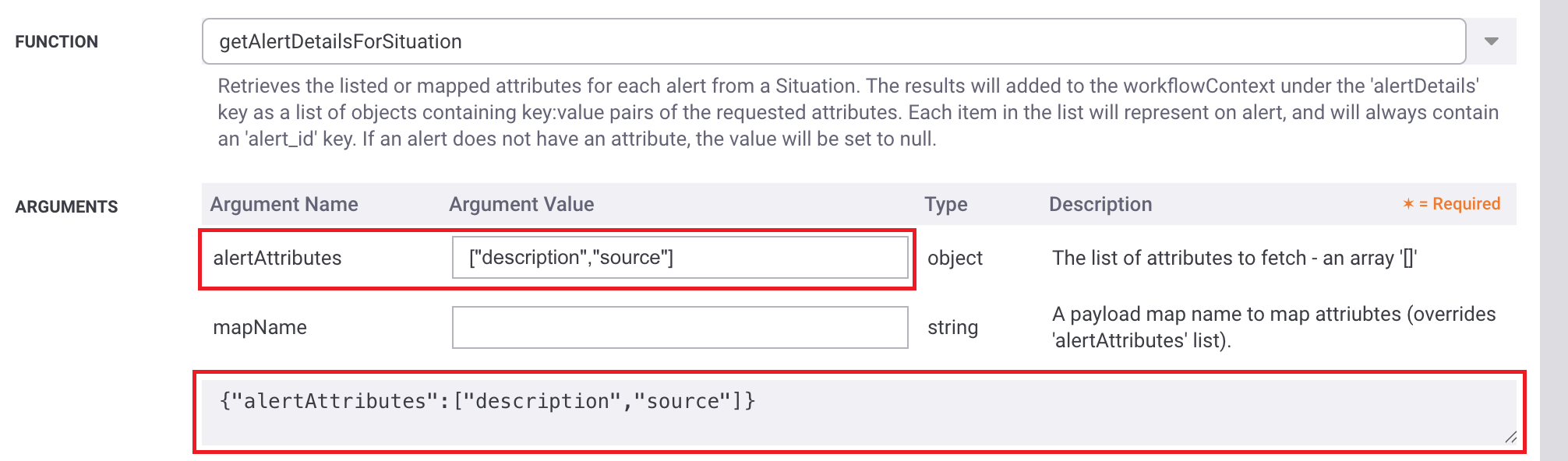 |
Produces an alertDetals object:
    "alertDetails": [
        {
            "description": "This is a test",
            "source": "10.0.0.1",
            "alert_id": "1530488"
        },
        {
            "description": "This is a test",
            "source": "10.0.0.1",
            "alert_id": "1530493"
        },
        {
            "description": "This is a test",
            "source": "10.0.0.1",
            "alert_id": "1530494"
        },
        {
            "description": "This is a test",
            "source": "10.0.0.1",
            "alert_id": "1530495"
        },
        {
            "description": "This is a test",
            "source": "10.0.0.1",
            "alert_id": "1530496"
        }
    ]
Macros cannot be used, and key names cannot be modified.
Defining Attributes via a Payload Map
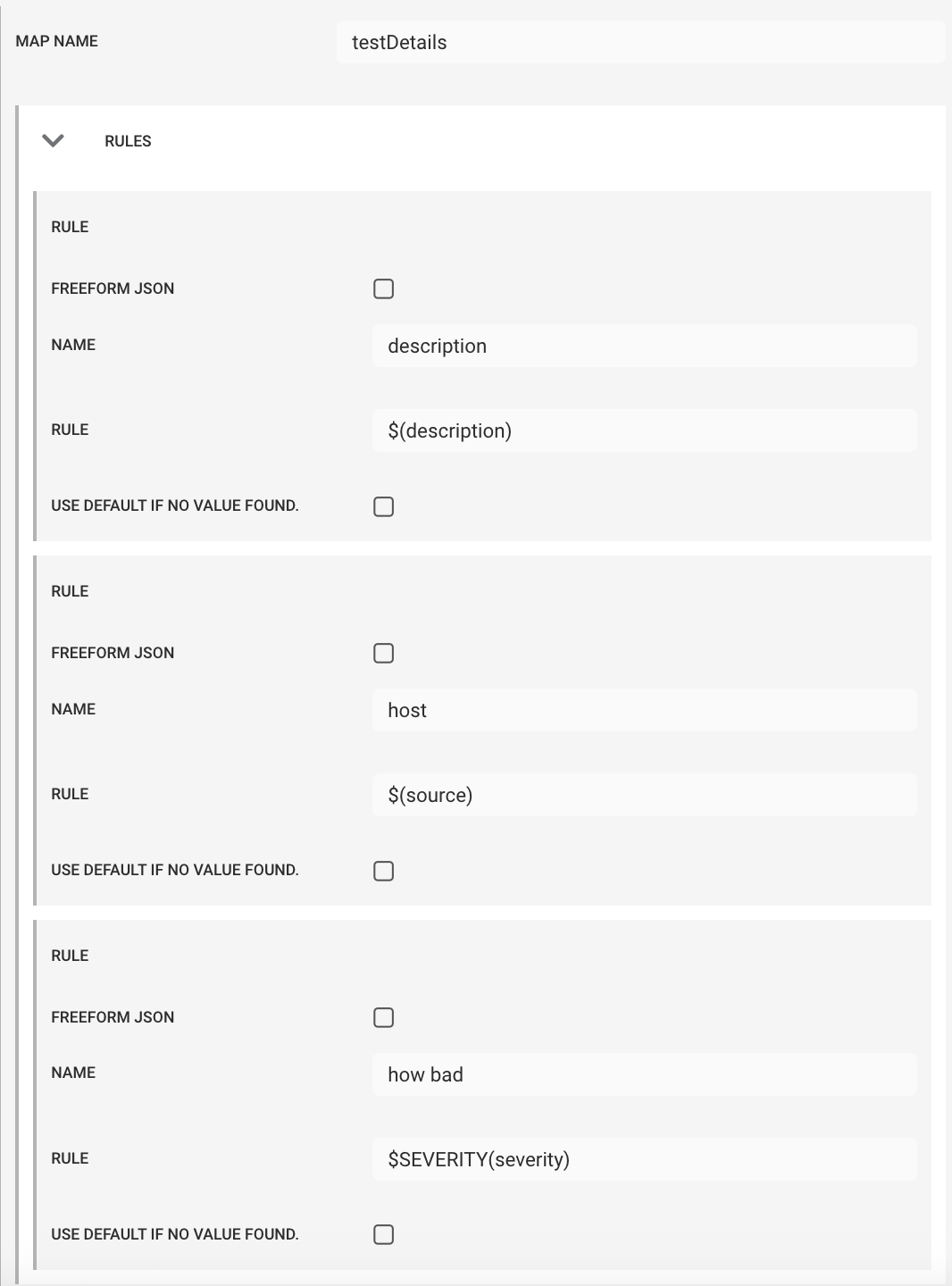
Using a Payload Map to define attributes enables the use of macros, allows custom key names, and supports a freeform JSON object.
For example, given a Payload Map:
 |
And given the action configuration below that uses this Payload Map:
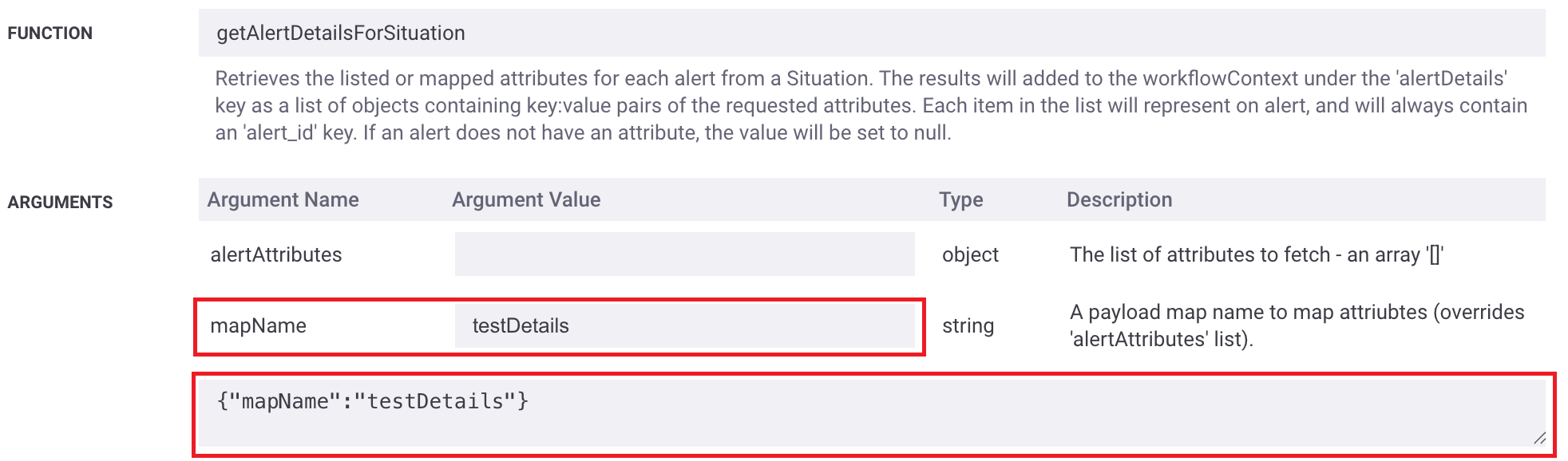 |
Produces the following alertDetails object using the defined key names and macros for the values.
"alertDetails": [
        {
            "description": "This is a test",
            "host": "10.0.0.1",
            "how bad": "Critical",
            "alert_id": "1530488"
        },
        {
            "description": "This is a test",
            "host": "10.0.0.1",
            "how bad": "Warning",
            "alert_id": "1530493"
        },
        {
            "description": "This is a test",
            "host": "10.0.0.1",
            "how bad": "Warning",
            "alert_id": "1530494"
        },
        {
            "description": "This is a test",
            "host": "10.0.0.1",
            "how bad": "Minor",
            "alert_id": "1530495"
        },
        {
            "description": "This is a test",
            "host": "10.0.0.1",
            "how bad": "Minor",
            "alert_id": "1530496"
        }
    ]
Note
As with other Situation alert examination actions (for example, the Situation Labeller), a maximum limit of 200 alerts is applied to reduce performance overhead.
If a Situation contains more than 200 alerts, only the first 200 alerts (sorted by alert_id in ascending order) are included in the alertDetails object.
Arguments
Workflow Engine function getAlertDetailsForSituation takes the following arguments:
Name | Required | Type | Description |
|---|---|---|---|
| no | object | Specifies the list of alert attributes to retrieve. |
| no | string | Specifies the name of a configured Payload Map. If both are defined, the Payload Map takes precedence over |