addLookbackAlerts
A Workflow Engine function that is used with a seeded Situation (defined through a seed filter) to add alerts that occurred prior to the seed alert in the Situation. Seeded correlation establishes a clear cause-and-effect relationship between alerts. However, it depends on the cause (seed) being generated before any related effects to be included. This dependency makes the correlation highly sensitive to the order in which alerts are received.
The addLookbackAlerts function removes this sensitivity by allowing the inclusion of relevant alerts that occurred before the seed alert, ensuring more accurate and complete correlation regardless of alert ordering.
The action includes a single parameter, lookback time (in seconds), which specifies how far to look back prior to Situation creation (see note below) when identifying alerts. The maximum supported value for this parameter is 3600 seconds (1 hour).
This action adds alerts to a Situation only when all of the following conditions are met:
The Situation is created by Cookbook.
The associated Recipe includes a seed filter.
The Recipe is not topology-based.
The Recipe does not use rate filtering.
Note
The lookback start time is calculated from the Situation creation time, not from the seed alert reception time. Using an alert threshold greater than 1 in a seeded correlation makes the lookback period more difficult to determine.
For example, if the alert threshold is set to 5, the Situation is created only after receiving the seed alert plus four subsequent effect alerts. In this case, the lookback period begins at the time of Situation creation (i.e., the fourth effect alert), rather than when the seed alert was received. As a result, the lookback window may extend across a variable duration, from the time of the seed alert up to the configured cook_for interval.
It is recommended to configure seeded correlations with an alert threshold of 1, so that the seed alert alone triggers the creation of the Situation. If additional validation is required, downstream workflows can be used to determine whether effect alerts are present in the Situation (for example, by evaluating the total_alerts value) before executing further actions.
This function is available as a feature of the Add-ons v2.7 download and later.
This function is available for Situation workflows only.
Back to Workflow Engine Functions Reference.
Methodology
The action first evaluates the Situation to determine whether it is suitable for processing. If any suitability criteria are not met (for example, if the Recipe is topology-based, rate-filtered, or not seeded), the action returns false and stops further execution.
A list of candidate alerts is retrieved based on the trigger and exclusion filters defined in the Recipe, extended by the configured lookback period.
For example, given a recipe:
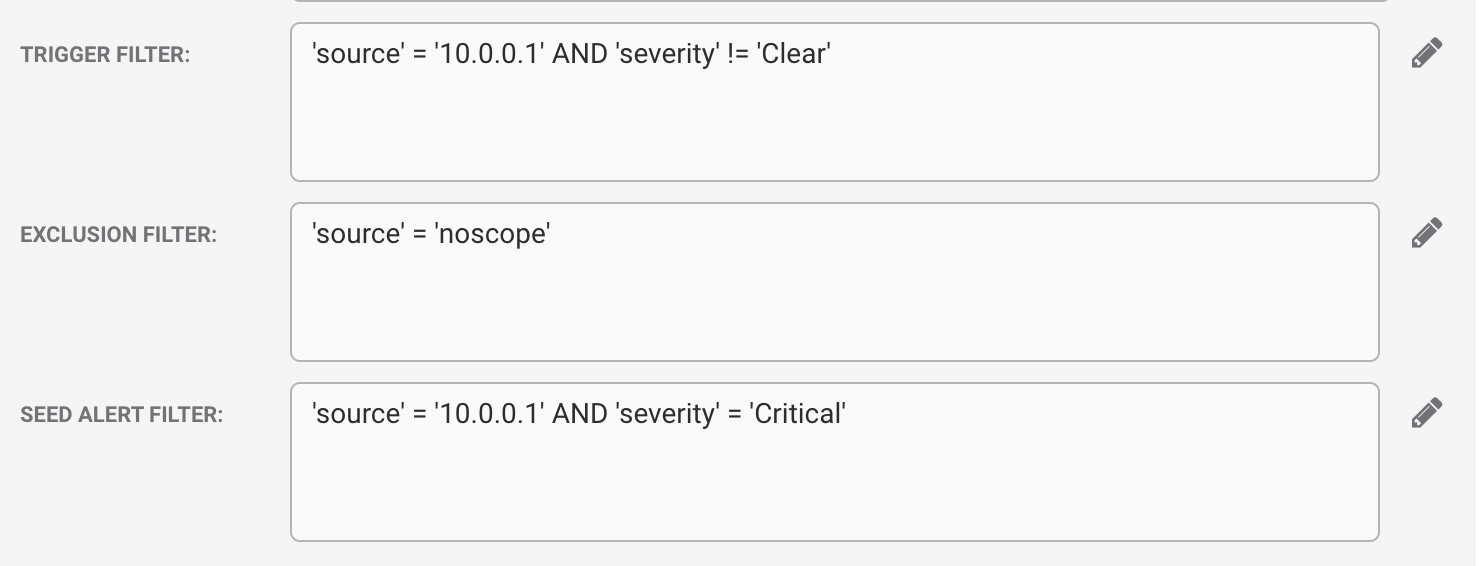
And a lookback period of 3600 the filter used would be:
(source = "10.0.0.1") AND (severity != 0) AND state != 9 AND last_event_time >= 1755504580 AND NOT (source = "noscope")
The reference alert for the Situation is retrieved. This represents the current state of the reference alert (i.e., the latest deduplicated values), rather than the original event that seeded the Situation.
The reference alert is compared with the candidate alerts using the configured matchers (clustering fields) in the Recipe. This comparison follows the same logic applied to alerts received after the seed.
List-based matchers perform a simple intersection check, requiring a 100% match for any common item between the reference and candidate alerts.
This approach avoids the performance overhead of comparing every list item with every other item.
As most list-based matchers are already configured for 100% similarity, this constraint has minimal operational impact.
Candidate alerts that do not satisfy all matcher conditions are excluded from further processing.
Candidate alerts that meet all matcher conditions are added to the Situation.
This triggers the labeller, ensuring the Situation description reflects the newly added alerts.
It initiates any downstream workflows associated with Situation updates and executes workflows linked through the labeller.
A thread entry is created to record the outcome of the action.
This entry is added to the “Support” thread.
Implementation
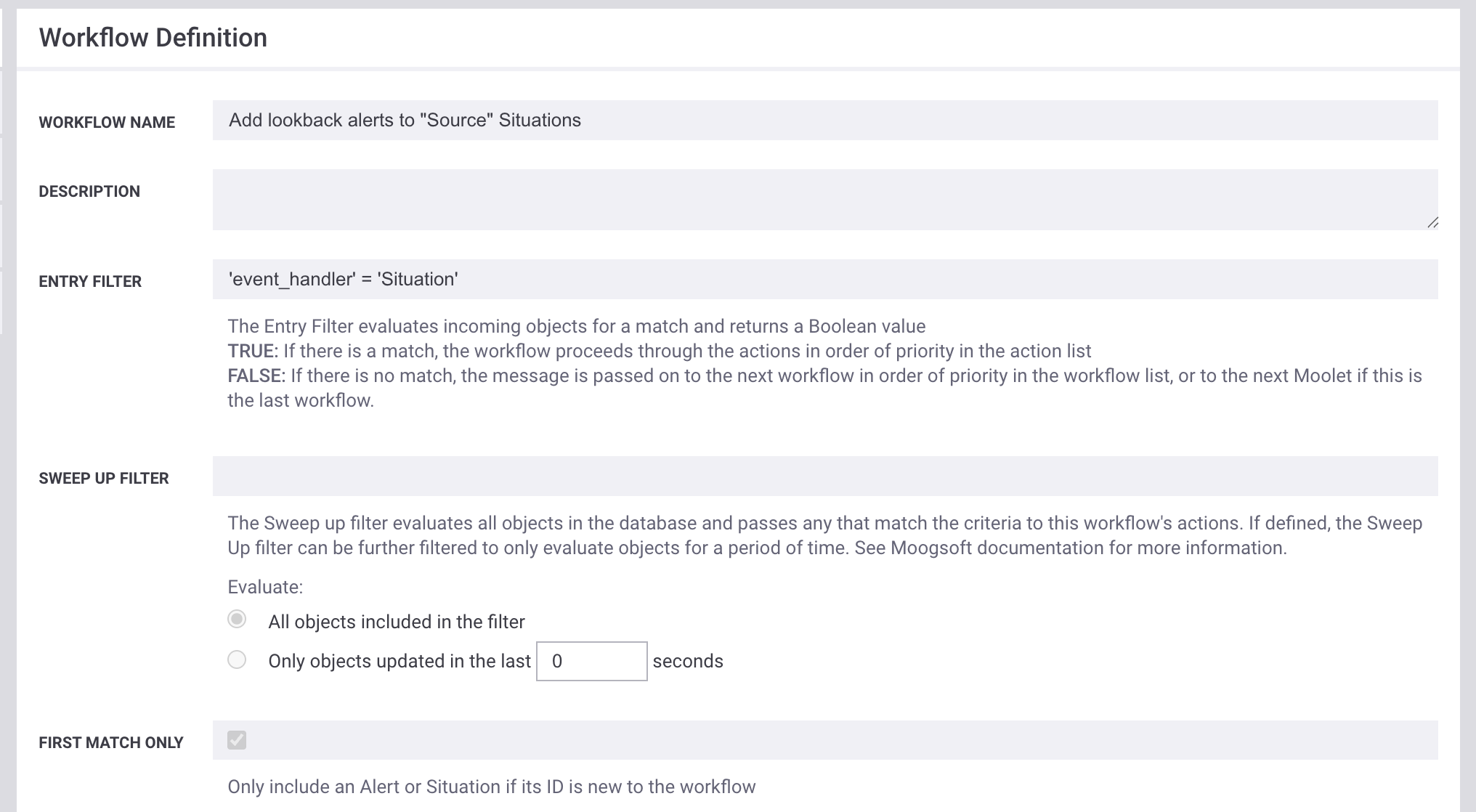
The addLookbackAlerts action should be configured as part of a "Situation Delta" workflow using the following structure:
Workflow Configuration
Workflow Name: Use a name that clearly reflects the Recipe to which the workflow applies.
Entry Filter:
event_handler= 'Situation'First Match Only: Set to
trueto ensure the workflow executes only once and avoids multiple executions.
Actions
Delay: Introduce a short delay (less than 5 seconds) to reduce the risk of race conditions and ensure stable execution.
sigActionFilter: Configures to check for "Situation Created", ensuring the action runs only when a new Situation is created.
filterByRecipe: Specifies the name of the target Recipe for this lookback configuration.
If this filter is not configured, the action executes for every Situation creation across all recipes, increasing API and database load.
It is strongly recommended to include this filter.
addLookbackAlerts: Configures the action with the required lookback time to add relevant historical alerts to the Situation.
Subsequent Actions: Add any additional actions as required by the workflow logic.
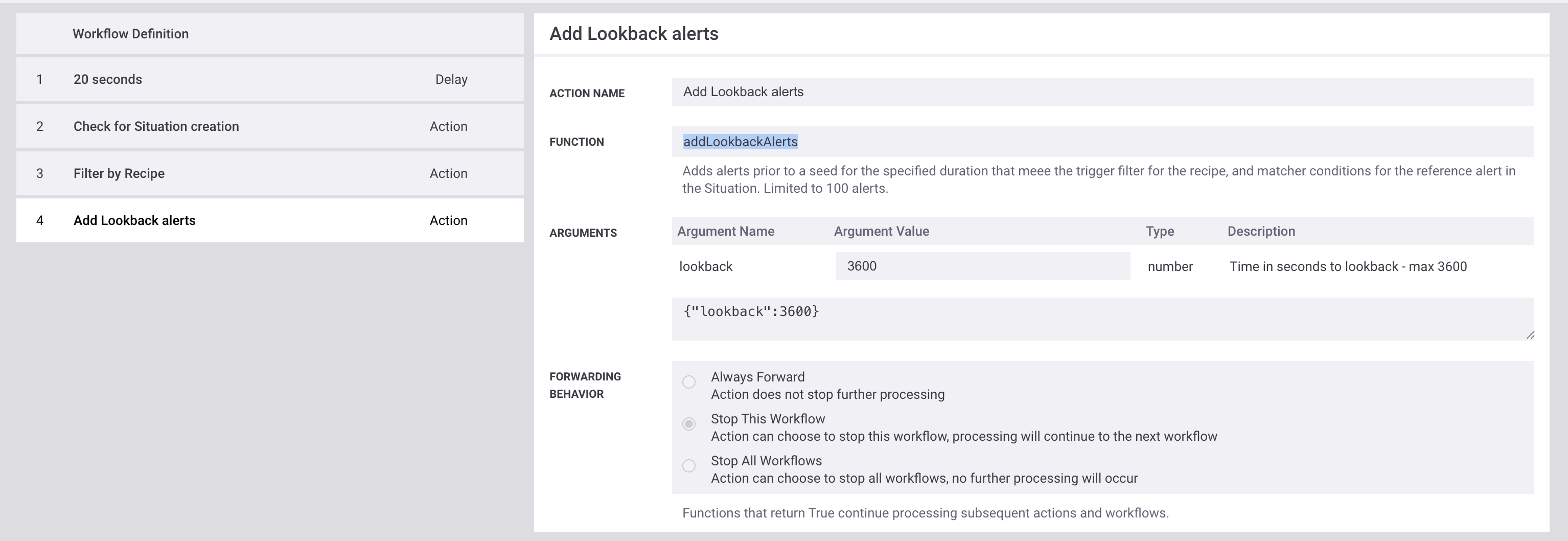
All configured actions must use “Stop this workflow” as the forwarding behavior to stop the current workflow, while allowing processing to continue to the next workflow.
Arguments
Workflow Engine function addLookbackAlerts takes the following arguments:
Name | Required | Type | Description |
|---|---|---|---|
lookback | yes | number | Specifies the lookback time in seconds when adding alerts. |